A git diff viewer for your whole branch

DiffHub is a git diff viewer that runs on your own machine and opens in your browser. Run npx diffhub@latest inside a git repository and it serves every changed file on localhost:2047: a file tree on the left, the diff on the right, split or unified, with syntax highlighting. Nothing is uploaded and there’s no account.
npx diffhub@latestA real pull request in the same viewer. No install.
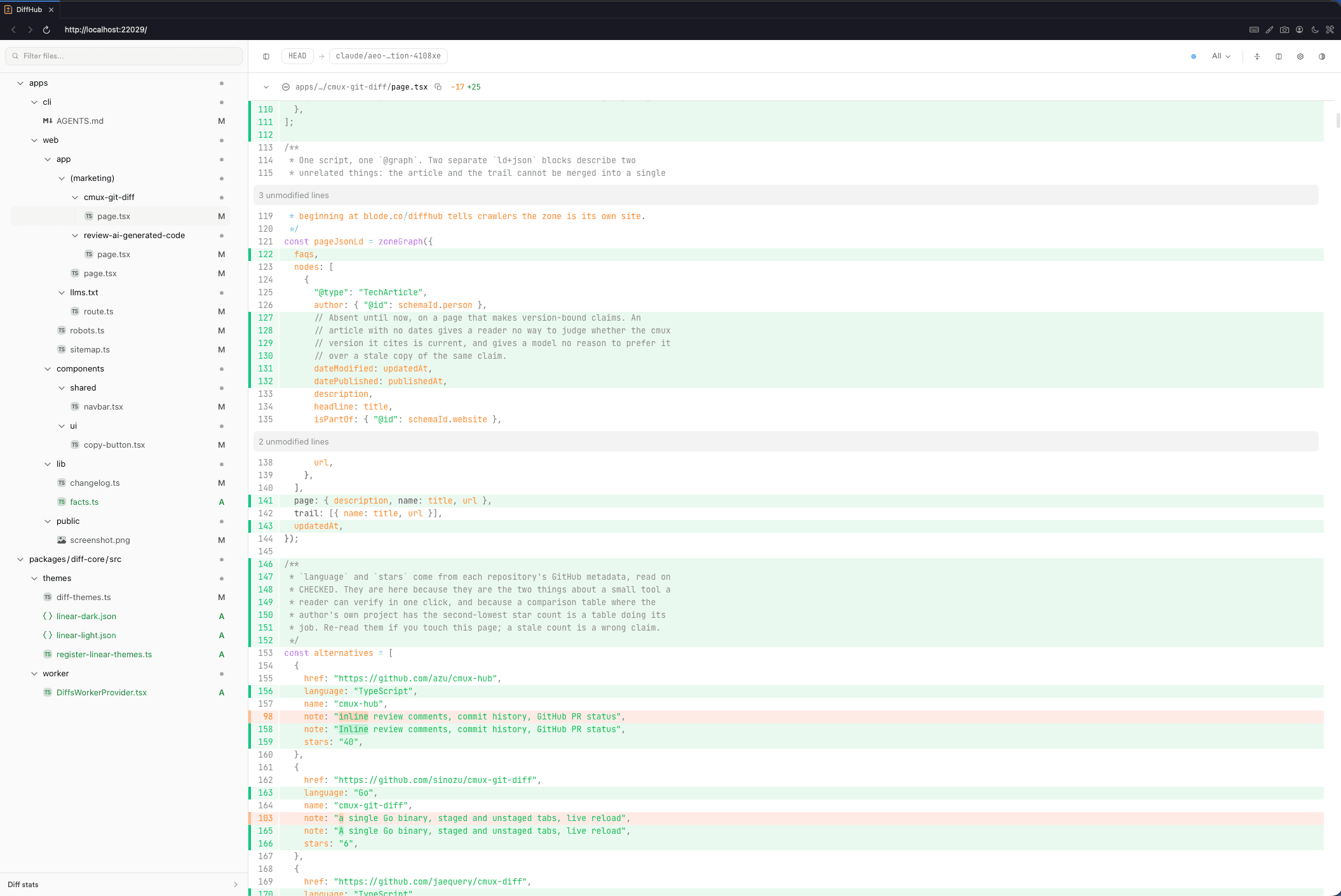
What does DiffHub show you?
Every file that changed, on one page. The tree on the left lists them with their added and removed line counts, and filters as you type. The diff on the right runs one file after another, so you can scroll the whole change like a pull request, or jump between files with j and k.
It watches the repository while it’s open. When a file changes, the status bar says updates are available, and the diff moves when you press r. Not before, so the line you’re reading doesn’t jump.
Can you see a git diff side by side?
Yes. Press s, or use the layout button in the status bar, to switch layouts. Split view puts the old file on the left and the new one on the right. Unified view puts removed and added lines in one column. Unified is the default. The viewer remembers whichever you picked last.
Which changes does it compare?
By default, everything you haven’t committed: HEAD against your working tree, plus untracked files. The scope menu in the status bar has four more views.
| Scope | Compares |
|---|---|
| Touched (default) | HEAD against the working tree, plus untracked files |
| All | The merge base with the base branch against the working tree, plus untracked files |
| Committed | The merge base against HEAD: your branch’s commits only |
| Staged | HEAD against the index, like git diff --cached |
| Unstaged | The index against the working tree, like plain git diff |
All and Committed need a base branch. DiffHub looks for origin/main, origin/master, origin/develop and origin/dev, then local branches with the same names. Pass --base <branch> if yours is called something else. The merge base is what keeps commits that landed on main after you branched out of your review.
DiffHub or a paste-in online diff tool?
Most “diff tool online” results are a page with two boxes. DiffHub runs in a browser too, but the page comes from a server on your machine, and it reads the change straight from git.
| Question | Typical paste-in site | DiffHub |
|---|---|---|
| What you compare | Two blocks of text you paste in | Every changed file in a git repository |
| Setup | None | Node 20.11+ or Bun 1.0.23+, then one command |
| Where your code goes | A page someone else hosts | A server on 127.0.0.1, on your machine |
| What it knows about git | Nothing | Base branch, merge base, staged, unstaged, untracked |
| Files at once | One pair | The whole change, with a file tree |
| Comments | Usually none | Per line, copied out as one prompt |
Use a paste-in site for two snippets that aren’t in a repository: a config from two servers, two API responses, a paragraph someone edited. Use DiffHub when the change lives in git and spans more than a file or two. It lets you read all of it before you commit or push.
Can you try it without installing anything?
Yes, on a public pull request. The live demo is the one hosted part of DiffHub: paste a GitHub pull request URL and it opens in the same viewer. It reads the pull request from GitHub, so it only works for public repositories, and comments need the local CLI.
What does it need, and where does it stop?
| Fact | Value | Source |
|---|---|---|
| Command | npx diffhub@latest | npm registry |
| Runtime | Node 20.11+, or Bun 1.0.23+ | apps/cli/package.json engines |
| Port | 2047, or the next free port up to 2056 | apps/cli/bin/diffhub.mjs |
| Listens on | 127.0.0.1 only | apps/cli/bin/diffhub.mjs |
| Outbound requests while running | 0 | CLI source |
| Inline render limit, per file | 500 changed lines, or 500,000 bytes of patch | apps/cli/lib/diff-file-stat.ts |
| Package size | 35.6 MB unpacked, 1,829 files | npm registry, diffhub 1.0.0, read 2026-09-22 |
| Licence | MIT | GitHub |
- It isn’t a website. There’s no hosted version for your own code, and the live demo only opens public GitHub pull requests.
- It only reads git. It won’t diff two loose files or folders, and it won’t start outside a repository.
- It needs Node 20.11+ or Bun 1.0.23+. There’s no standalone binary, and the package is 35.6 MB unpacked.
- A file with 500 or more changed lines, or 500,000 bytes of patch, isn’t rendered inline. Lockfiles hit this constantly.
- It doesn’t review anything for you. You read the diff. It keeps your notes.
Reviewing what a coding agent wrote is where the comments earn their place. How to review AI-generated code covers what to look for.
What else do people ask about git diff viewers?
Is there a hosted online version of DiffHub?
No. DiffHub runs on your machine, because it reads your repository from disk. The closest thing is the live demo, which opens any public GitHub pull request in the same viewer with no install.
Does DiffHub upload your code?
No. It serves the viewer from 127.0.0.1, makes no outbound requests while it runs, and keeps comments in .git/diffhub-comments.json inside your repository.
Can DiffHub show a git diff side by side?
Yes. Press s, or use the layout button in the status bar, to switch between split and unified views. Unified is the default, and the viewer remembers your choice.
Can it compare two files that aren’t in a git repository?
No. DiffHub only reads git. For two loose files, git diff --no-index old.txt new.txt works in a terminal, and a paste-in diff site works in a browser.
How is DiffHub different from git difftool?
git difftool hands each changed file to an external tool, one at a time unless you pass --dir-diff. DiffHub puts every changed file on one page with a file tree, and keeps line comments you can copy out.
Is DiffHub free?
Yes. It’s MIT licensed, on npm as diffhub, with no account and no paid tier.